Build your first AI Chatbot on HPE Private Cloud AI using Flowise and HPE MLIS
July 11, 2025In today’s AI-driven landscape, conversational interfaces are transforming how organizations interact with users and automate workflows. Building a secure, scalable, and customizable chatbot solution requires robust infrastructure and flexible AI tooling. HPE Private Cloud AI provides a powerful platform for deploying and managing AI workloads, while Flowise and HPE Machine Learning Inference Software offer the tools to rapidly build, deploy, and manage chatbots powered by large language models (LLMs).
This blog post walks you through deploying FlowiseAI on HPE PCAI to build a modern chatbot solution. By leveraging these technologies, organizations can accelerate chatbot development, ensure data privacy, and maintain full control over their AI lifecycle.
HPE Private Cloud AI
HPE Private Cloud AI (HPE PCAI) offers a comprehensive, turnkey AI solution designed to address key enterprise challenges, from selecting the appropriate LLMs to efficiently hosting and deploying them. Beyond these core functions, HPE Private Cloud AI empowers organizations to take full control of their AI adoption journey by offering a curated set of pre-integrated NVIDIA Inference Microservices (NIM) LLMs, along with a powerful suite of AI tools and frameworks for data engineering, analytics, and data science.
HPE Machine Learning Inference Software is a user-friendly solution designed to simplify and control the deployment, management, and monitoring of machine learning (ML) models, including LLMs, at any scale.
HPE Private Cloud AI has pre-integrated NVIDIA NIM LLMs, a suite of AI tools (including HPE Machine Learning Inference Software), and a flexible Import Framework that enables organizations to deploy their own applications or third-party solutions, like FlowiseAI.

What is Flowise?
Flowise is an open source generative AI development platform for building AI Agents and LLM workflows. It provides a visual interface for designing conversational flows, integrating data sources, and connecting to various LLM endpoints. Flowise provides modular building blocks for you to build any agentic systems, from simple compositional workflows to autonomous agents.
Deploying Flowise via import framework
1. Prepare the Helm charts
Obtain the Helm chart for Flowise v5.1.1 from artifacthub.io. Following changes to the Helm chart are needed to deploy it on HPE Private Cloud AI.
Add the following YAML manifest files to templates/ezua/ directory:
- virtualService.yaml: Defines an Istio VirtualService to configure routing rules for incoming requests.
- kyverno.yaml: A Kyverno ClusterPolicy that automatically adds required labels to the deployment.
Updates to values.yaml file
- Set resource request/limits.
- Update the PVC size
- Add the following 'ezua' section to configure the Istio Gateway and expose the endpoint.
ezua:
  virtualService:
    endpoint: "flowise.${DOMAIN_NAME}"
    istioGateway: "istio-system/ezaf-gateway"
Here's the reference document for the import framework prerequisites.
These updates are implemented in the revised Flowise Helm charts, and are available in the GitHub repository ai-solution-eng/frameworks. With these customizations, Flowise can now be deployed on HPE Private Cloud AI using Import Framework.
2. Deploy Flowise via the import framework
Use the import framework in HPE Private Cloud AI to deploy Flowise.


3. Access Flowise UI via its endpoint
After deployment, Flowise will appear as a tile under Tools & Frameworks / Data Engineering tab.

Click the Open button on the Flowise Tile, or click on the Endpoint URL to launch the Flowise login page. Setup the credentials and login.

Deploy a LLM in HPE MLIS
HPE MLIS is accessed by clicking on HPE MLIS tile in Tools & Frameworks / Data Engineering tab.

To deploy a pre-packaged LLM (Meta/Llama3-8b-instruct) in HPE MLIS, you need to know how to add a registry, a packaged model, and how to create deployments.
1. Adding a registry
You'll first want to add a new registry called "NGC", which refers to NVIDIA GPU Cloud. This can be used to access pre-packaged LLMs.

2. Adding a packaged model
Create a new packaged model by clicking the Add New Model tab. Fill in the details as shown in the below screen shots.

Choose the registry created in the previous step and select 'meta/llama-3.1-8b-instruct' for the NGC Supported Models

Set the right resources required for the model. Do this by choosing from either a built-in template or "custom" in the Resource Template section.


Newly created packaged model appears in the UI.

3. Creating deployments
Using the packaged model created in the previous step, create a new deployment by clicking on Create new deployment.

Give a name to the deployment and choose the packaged model created in the previous step.


Set auto scaling as required. In this example, we have used 'fixed-1' template.


The LLM is now deployed and can be accessed using the endpoint and corresponding API token.

Create AI Chatbot in Flowise
Use Flowise's drag-and-drop interface to design your chatbot’s conversational flow. Integrate with HPE MLIS by adding an LLM node and configuring it to use the MLIS inference endpoint.
- Add New Chatflow:

Save the Chatflow using the name "AI Chatbot" and add the following nodes, making the connections shown in the screenshot.
- Chat Models (Chat NVIDIA NIM): Set Deployment 'Endpoint' from HPE MLIS as 'Base Path', corresponding 'Model Name' and 'API Key' from HPE MLIS for 'Connect Credential'.
- Memory (Buffer Window Memory): Set appropriate 'Size'.
- Chains (Conversation Chain): Connect 'Chat NVIDIA NIM' and 'Buffer Window Memory' nodes as shown.

Your new AI Chatbot is now ready! You may quickly test it by clicking the chat icon on the top right corner of the screen.

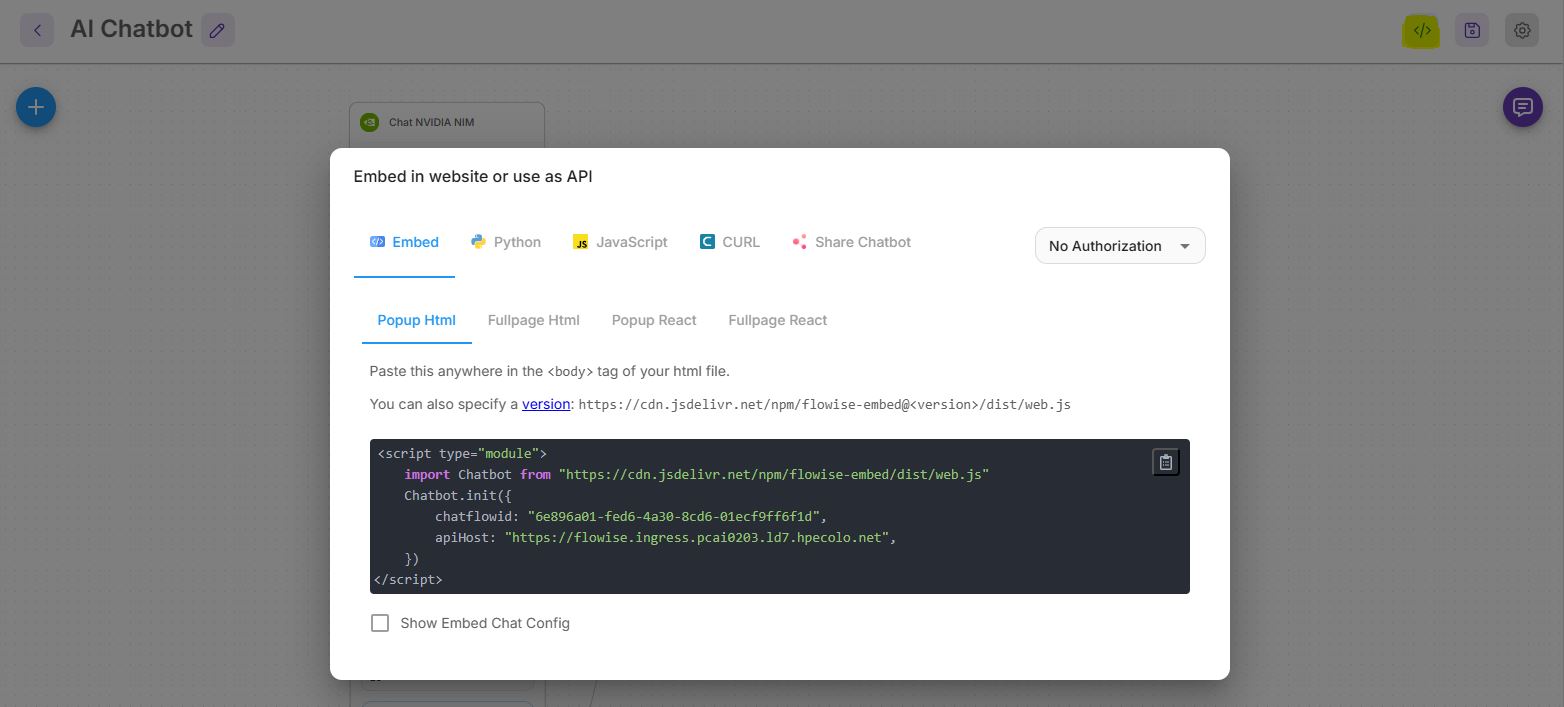
Accessing AI Chatbot from external applications
Flowise provides an API endpoint for the chatbot, with multiple ways of integrating it with your applications. Also, you may explore multiple configurations that are available to enhance the chatbot.
Conclusion
By combining Flowise’s intuitive chatbot builder with HPE MLIS’s robust model management, HPE Private Cloud AI empowers organizations to rapidly develop, deploy, and govern conversational AI solutions. This integrated approach ensures data privacy, operational control, and scalability for enterprise chatbot deployments.
Stay tuned to the HPE Developer Community blog for more guides and best practices on leveraging HPE Private Cloud AI for your AI.
Related

Setting up Harbor as a local container registry in HPE Private Cloud AI
Jul 3, 2025
LLM Agentic Tool Mesh: Exploring chat service and factory design pattern
Nov 21, 2024