
The Agentic AI command center for project managers
September 8, 2025Part 6 of our Gen AI for PM series
Imagine a single screen where every moving part of your project comes together—tasks, risks, resources, and communications—all continuously monitored by AI. That’s the vision behind the Agentic AI command center.
Rather than juggling spreadsheets, dashboards, and status meetings, through its use, project managers gain a central hub powered by intelligent agents. Each agent watches a different dimension of the project—tracking schedules, scanning for risks, analyzing sentiment, or monitoring budgets—and feeds insights into one unified view. The result is a real-time command center that helps managers move from reacting to problems to proactively steering projects toward success.
PM dashboards vs. intelligent command centers
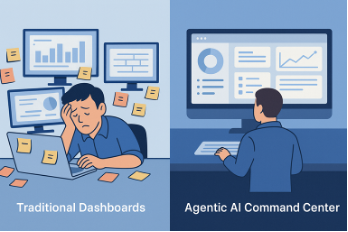
Every project manager knows the struggle fifteen open browser tabs, dashboards from five different tools, Slack buzzing with updates, and a Gantt chart that was outdated yesterday. Traditional dashboards are useful, but they’re static snapshots to show you what happened, not what’s about to happen.
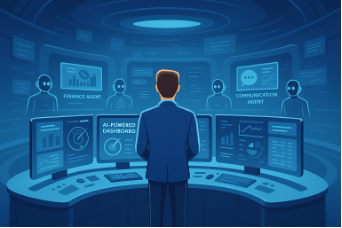
Now imagine this instead: A single command center powered by intelligent agents, orchestrating every aspect of your project in real time. Not just a dashboard but a digital control room that listens, predicts, and suggests.
That’s the promise of the Agentic AI command center.
The side-by-side illustration shows the difference between today’s fragmented workflows and the future of project management with Agentic AI. On the left, a project manager is overwhelmed, juggling multiple dashboards and sticky notes, each tracking only part of the project. On the right, everything comes together in a clean, futuristic AI command center—a single screen that consolidates tasks, risks, resources, and updates in real time. This shift makes project oversight simpler, smarter, and far less stressful.
Section 1: Unified view of project health with agent orchestration
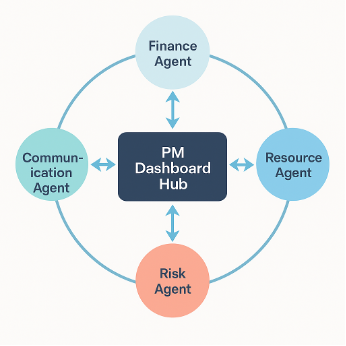
Instead of siloed dashboards, an Agentic AI command center unifies everything. Think of it as a digital war room where specialized agents handle different dimensions of project health:
- Finance agent → tracks budgets, forecasts, and alerts on overruns.
- Resource agent → monitors workloads and reallocates tasks.
- Risk agent → scans dependencies and external factors for early warnings.
- Communication agent → tailors updates for each stakeholder group.
As an example: If a supplier misses a milestone, the Risk agent flags it, the Resource agent suggests reallocation, the Finance agent recalculates the budget, and the Communication agent updates stakeholders is all seamlessly orchestrated in the command center.
The illustration below shows how multiple specialized AI agents work together to support project managers. Each agent—covering Finance, Resource, Risk, and Communication monitors its domain in real time and feeds insights into a central Project Management Dashboard Hub.
This circular flow ensures that no critical aspect is overlooked. Finance agents track budgets, resource agents optimize workloads, risk agents flag potential blockers, and communication agents keep stakeholders aligned. By consolidating all of this intelligence into one hub, project managers gain a 360° view of the project, enabling faster, more confident decisions.
Section 2: Natural language queries for real-time insights
Forget clicking through endless filters or waiting for reports. In the AI command center, you simply ask questions in plain language:
- “Which milestones are most at risk this quarter?”
- “Show me the cost impact if Vendor X slips by two weeks.”
- “Who’s overbooked for next sprint?”
The system parses your question, pulls data from across tools, and gives you instant, visual insights.
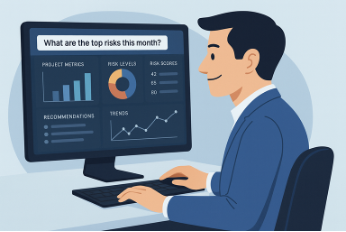
As an example: A PM types, “Show me the top 3 risks for Project Alpha.” The command center instantly displays a ranked heatmap with probabilities, impact scores, and suggested mitigations.
The illustration below shows how project management becomes more conversational with Agentic AI. A project manager simply types a question into the system, and within seconds the screen displays graphs, risk scores, and tailored recommendations. This natural, question-and-answer interaction allows managers to skip manual data digging and instead get instant, actionable insights—turning complex project analysis into a simple conversation.
Section 3: Integrated decision support
Traditional dashboards tell you the “what.” The Agentic AI command center also tells you the “what next.”
It doesn’t just show a risk — it suggests responses based on data and simulations:
- Adjust timelines.
- Reallocate resources.
- Increase budget buffers.
- Recommend alternate vendors.
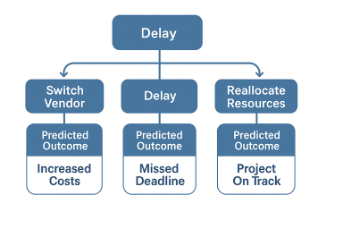
Consider this example: When a critical vendor signals a delay, the command center simulates scenarios:
- Option A: Wait for the vendor → project slips by 10 days.
- Option B: Switch to backup vendor → budget rises 5%.
- Option C: Reallocate internal resources → timeline preserved, but lower capacity for another workstream.
The PM chooses, but the AI provides the decision support.
The decision-tree diagram below shows how AI helps project managers evaluate different choices when facing a delay. The decision tree outlines three possible actions:
· Switch Vendor, which is predicted to result in increased costs.
· Do nothing and accept the delay, which leads to a missed deadline.
· Reallocate Resources, which keeps the project on track.
By mapping out the likely outcomes of each option, the system gives managers the clarity they need to make faster and more informed decisions.
Security and audit logs for compliance
In industries like finance, healthcare, and government, compliance is just as important as delivery. The AI command center builds compliance into the workflow:
- Every decision is logged with a timestamp and rationale.
- Audit-ready reports are generated automatically.
- Sensitive data is flagged and access-controlled.
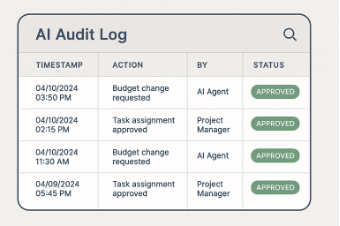
Consider this example: A central bank project team uses the command center. When budget reallocations happen, the system auto-generates an audit report with “Who approved, When, Why, Impact Analysis.” Compliance is no longer a scramble at the end — it’s baked into daily operations.
The illustration below shows how an AI audit log keeps track of every action in a project for transparency and accountability. Each entry records the timestamp, the action taken, who initiated it—whether an AI agent or a project manager—and the status of that action. For example, task approvals and budget changes are neatly logged and marked as approved, making it easy to review decisions and maintain trust in AI-assisted project management.
Conclusion: The “One screen to rule them all” for PMs
For decades, project managers have been stuck hopping between tools, spreadsheets, and dashboards. The Agentic AI command center changes that.
It becomes the one screen to rule them all -- unifying project health, answering questions in natural language, providing decision support, and ensuring compliance.
Instead of drowning in fragmented tools, project managers can finally focus on strategy, leadership, and outcomes.
Key takeaway
AI command centers replace fragmented tool-hopping — giving project managers foresight, clarity, and control in one place.
Related
From Gantt charts to Generative AI: How Agentic AI is revolutionizing project management
Aug 27, 2025AI agents as the meeting whisperers
Sep 9, 2025
Experimenting with the Model Context Protocol and Chapel
Aug 28, 2025
From generative to agentic AI: Tracing the leap from words to actions
Jul 3, 2025Your new PM assistant: The rise of Agentic AI in daily task management
Aug 27, 2025Multi-agent systems for multi-stakeholder projects
Aug 30, 2025
Part 3: Model Context Protocol (MCP): The protocol that powers AI agents
Jul 18, 2025