

Multi-agent systems for multi-stakeholder projects
August 30, 2025Part 4 of our Gen AI for PM series
Intro
Large projects often involve multiple stakeholders, each with different priorities, risks, and information needs. Managing all of these moving parts with a single tool or process quickly becomes overwhelming. This is where multi-agent systems come in.
By assigning specialized AI agents to handle distinct responsibilities, such as scheduling, compliance, risk management, or communication, projects can scale more smoothly. Each agent works autonomously within its domain but shares insights with others, creating a coordinated ecosystem that adapts to stakeholder demands in real time. For project managers, this means fewer blind spots, faster responses, and better alignment across diverse teams.
Coordinating across departments is chaotic
If you’ve ever managed a cross-department project, you know how messy things can get. Finance is tracking budgets in spreadsheets. Engineering is sprinting toward deadlines in Jira. Marketing is waiting for updates before they can launch campaigns. And operations? They’re buried in vendor calls.
What ties it all together? Usually, it’s the project manager(PM) stuck in the middle — drowning in emails, calendar invites, and status requests.
This coordination chaos is where multi-agent systems step in. Instead of a single PM being the communication bottleneck, digital agents act like specialized assistants, each handling a slice of responsibility and keeping everyone aligned.
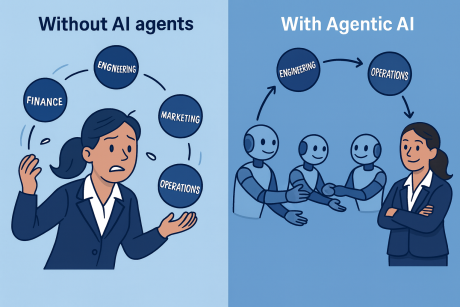
The image compares two scenarios of project management:
- Left side (“Without AI agents”)\ A project manager (PM) is overwhelmed, juggling multiple responsibilities at once Finance, Engineering, Marketing, and Operations. This represents the traditional challenge of keeping all stakeholders aligned manually.
- Right side (“With Agentic AI”)\ Instead of juggling, AI agents work together seamlessly. Each ball (Finance, Engineering, Marketing, Operations) is smoothly passed around by specialized AI agents, with the PM overseeing rather than micromanaging.
Section 1: Defining multi-agent collaboration
So, what is multi-agent collaboration?
Think of it this way: Instead of one AI tool doing everything, you have multiple AI agents, each with a defined role, working together like a team. They:
- Collect data from their respective domains.
- Communicate findings automatically.
- Coordinate actions with other agents.
- Keep the PM in the loop with summaries, not overload.
It’s like moving from a single Swiss Army knife to a team of expert specialists — each focused, each efficient, and each accountable.
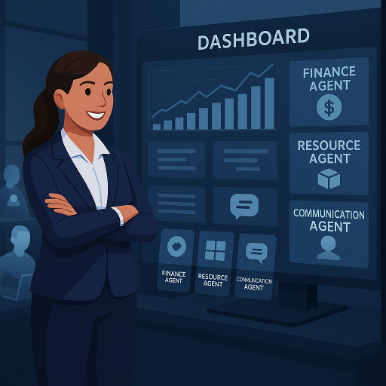
Consider this example: In a construction project, a Resource Agent monitors workforce schedules, a Finance Agent tracks cost overruns, and a Compliance Agent ensures safety requirements are met. Together, they keep the project moving without endless manual updates.
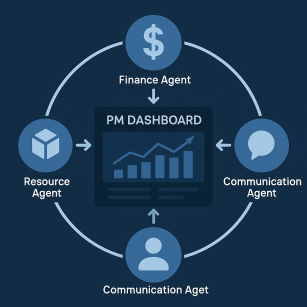
The circular diagram you mentioned is a way to visualize how Agentic AI creates a connected ecosystem around a project manager’s dashboard:
- Finance Agent → Feeds budget updates, cost forecasts, and expense alerts directly into the dashboard.
- Resource Agent → Monitors workload distribution, capacity, and availability of team members, updating the dashboard in real time.
- Communication Agent → Pulls in updates from team channels, emails, or tools like Slack and pushes them to the dashboard as structured insights.
At the center sits the PM Dashboard — the single source of truth where the project manager can see all three streams of intelligence combined.
Section 2: Role-based agents in action
Let’s break down some of the most useful role-based agents:
Finance agent – Tracks spending vs. budget in real time, sends alerts if costs exceed thresholds, and shares instant updates with stakeholders.
- Scenario: A procurement request pushes spend 5% over budget. The Finance Agent flags it, informs the Resource Agent, and updates the PM automatically.
Resource agent – Balances workloads, reallocates tasks when someone is overbooked, and ensures skills are matched to priorities.
- Scenario: A key engineer is on sick leave. The Resource Agent shifts their tasks to the next available developer, updates Jira, and notifies the team.
Communication agent – Tailors updates for each stakeholder group without flooding inboxes.
- Scenario: Instead of a giant status email, the Communication Agent sends Finance a budget snapshot, Marketing a timeline update, and the PM a summary dashboard.
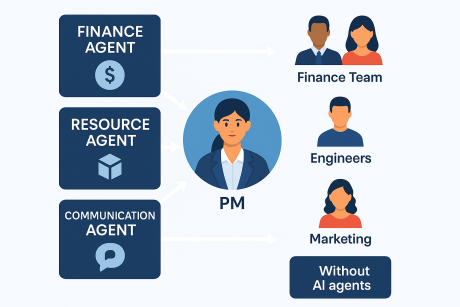
This image shows how different AI agents act as specialized assistants for various project needs and how their insights flow directly to the right stakeholders:
- Finance Agent → Tracks budgets, expenses, and forecasts. Its updates flow to the Project Manager and Finance Team, ensuring they always know where the money is going.
- Resource Agent → Balances workloads, predicts availability, and flags bottlenecks. Its insights go to the Engineers and PM, helping optimize who works on what and when.
- Communication Agent → Monitors updates from meetings, emails, and chat tools. It delivers structured updates to the Marketing Team and other stakeholders, cutting through noise and ensuring everyone stays aligned.
At the center of it all is the Project Manager, who no longer has to manually chase updates. Instead, each stakeholder gets the right information at the right time, automatically delivered through these AI agents.
Section 3: Automatic cross-team updates
One of the biggest pain points in multi-stakeholder projects is information lag. By the time Finance updates the budget, Engineering has already made a decision that conflicts with it.
Multi-agent systems eliminate this lag.
- Agents share updates across domains instantly.
- Dependencies update automatically in connected dashboards.
- Stakeholders see the latest info without needing to ask.
In a global product launch:
- Finance updates ad spend forecasts → Finance Agent updates Marketing instantly.
- Engineering delays a feature by one week → Resource Agent updates the timeline, and Communication Agent informs all stakeholders.
No “Monday catch-up” required — the project updates itself.
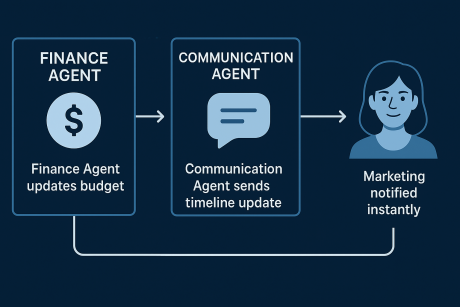
This flow diagram demonstrates how Agentic AI streamlines cross-team updates automatically:
- Finance Agent updates the budget → Whenever there’s a change in cost or resource usage, the Finance Agent instantly logs it.
- Communication Agent sends a timeline update → The Communication Agent translates the finance change into a project impact update (e.g., “Timeline adjusted by 2 days”).
- Marketing notified instantly → Instead of waiting for a weekly sync or status meeting, the Marketing team gets the update in real time, ensuring they can adjust campaigns or customer communications without delay.
Section 4: Transparency without meeting overload
Meetings are the traditional fix for misalignment. But too many meetings kill productivity.
With multi-agent systems, transparency is built-in:
- Live dashboards show the current state of play.
- Agents generate concise, role-specific updates.
- PMs only call meetings for strategic discussions, not routine updates.
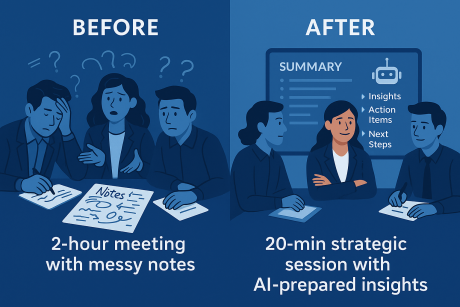
Consider this example: A weekly 2-hour cross-department sync shrinks into a 20-minute strategic review. Why? Because agents have already updated budgets, tasks, and dependencies in real time.
This graphic illustrates the productivity shift that AI meeting support brings:
- Before: A typical project meeting lasts two hours, with messy handwritten or scattered digital notes. Action items often get lost, follow-ups are inconsistent, and team members leave with different interpretations of what was decided.
- After: With AI agents in place, the same meeting takes just 20 minutes. The AI captures the discussion in real time, generates a clear summary, assigns owners to tasks, and even prioritizes next steps. The result is a strategic, focused session where everyone leaves aligned — without the fatigue of long, unstructured meetings.
Conclusion: Project updates become a living knowledge base
Multi-agent systems don’t just automate tasks — they transform how knowledge flows across a project. Updates are no longer buried in inboxes or trapped in one department’s tool. Instead, they become part of a living, evolving knowledge base, accessible to everyone, at any time.
For PMs, this means less time chasing updates and more time focusing on leadership, strategy, and outcomes. For stakeholders, it means the right information, in the right format, at the right time.
Key takeaway
Each stakeholder gets the right update, at the right time — thanks to multi-agent systems.
Related

From generative to agentic AI: Tracing the leap from words to actions
Jul 3, 2025
Part 3: Model Context Protocol (MCP): The protocol that powers AI agents
Jul 18, 2025Part 12: AgentOS - The invisible conductor of enterprise AI
Aug 28, 2025
Demystifying machine learning at scale: HPE Ezmeral Unified Analytics in action
May 20, 2024AI agents as the meeting whisperers
Sep 9, 2025Your new PM assistant: The rise of Agentic AI in daily task management
Aug 27, 2025From Gantt charts to Generative AI: How Agentic AI is revolutionizing project management
Aug 27, 2025