
Introduction
Our HPE colleague Enrique Larriba wrote an excellent post on automating HPE OpsRamp using Terraform Infrastructure as Code. Customers successfully adopting this practice will benefit from the speed and consistency of deploying configuration declaratively, but may face two challenges in their adoption journey:
- Unless the configuration is used for a one-off provisioning activity, they will need to maintain a ''golden'' configuration as source of truth.
- Users running provisioning and configuration activities will need to share the state file that tracks the infrastructure that has been built using OpenTofu (or Terraform). This state file contains secrets and other sensitive information so the file will need to be encrypted and stored in a secure location.
Fortunately, the first challenge has already been resolved by version control solutions such as Git and its workflows. Setting up a secure file repository and state file encryption will address the second challenge.
This post is a tutorial on how to set up a basic GitOps environment with GitHub as configuration and secret credentials version-controlled repository, and Amazon Web Services (AWS) S3 as shared storage for the state file.
Requirements
For this tutorial I will use:
- HPE OpsRamp API credentials and tenant information obtained via Custom Integration.
- GitHub as configuration repository.
- GitHub Actions as the runner that will carry out the configuration activities.
- Amazon Web Services, specifically S3 to store the state file.
Other Git forges, runners, and remote storage solutions are available.
Setting up HPE OpsRamp
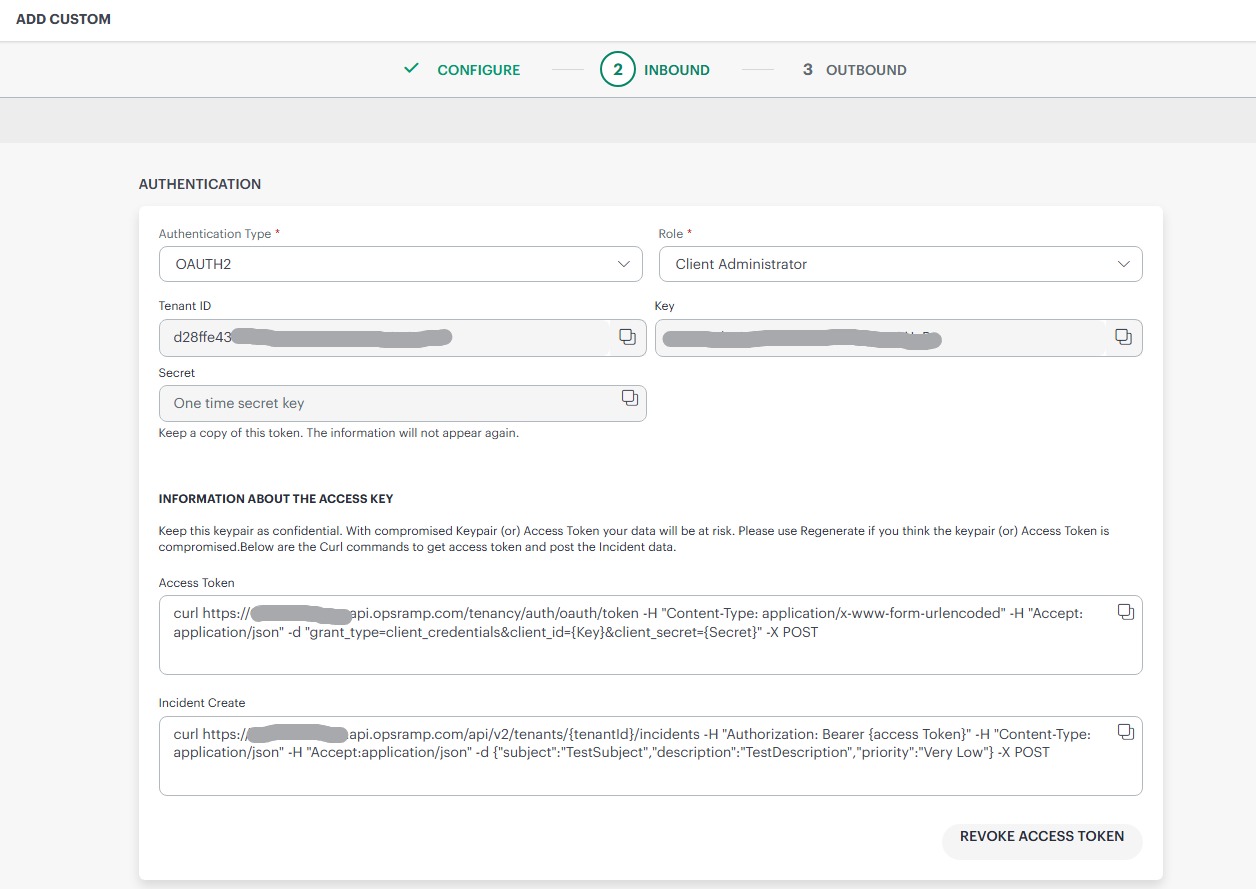
As the HPE Terraform provider uses the HPE OpsRamp API in the background, I need to create a Custom Integration by browsing to Setup, Account, Integrations. I provide a name (e.g. "OpenTofu") and then on the Inbound page I will select OAuth2 as authentication type and an administrator role as I will be running administration tasks.
I then click on the Generate Key button and take a note of the Tenant ID, the Key, the Secret, and the URL that is displayed in the text box below, e.g. example.api.opsramp.com
There is no need to map any attributes, configure any properties, and the Outbound page can be left empty.
Creating a GitHub repository
I create a new GitHub repository where I am going to manage our configuration. The URL of the repository will look like https://github.com/YOUR_ORGANIZATION/YOUR_REPO and I take a note of both the name of the organisation and the repository for the next step.
Setting up Amazon Web Services
I log into my AWS account, on IAM I create an OIDC identity provider with URL https://token.actions.githubusercontent.com and then I create a trust policy with the following content, replacing AWS_ACCOUNT_ID with my AWS Account ID, and YOUR_ORGANIZATION and YOUR_REPO with the values from GitHub repository creation step above.
{
    "Version": "2012-10-17",
    "Statement": [
        {
            "Effect": "Allow",
            "Principal": {
                "Federated": "arn:aws:iam::AWS_ACCOUNT_ID:oidc-provider/token.actions.githubusercontent.com"
            },
            "Action": "sts:AssumeRoleWithWebIdentity",
            "Condition": {
                 "StringEquals": {
                        "token.actions.githubusercontent.com:aud": "sts.amazonaws.com"
                    },
                "StringLike": {
                    "token.actions.githubusercontent.com:sub": "repo:YOUR_ORGANIZATION/YOUR_REPO:*"
                }
            }
        }
    ]
}
Then, I create a S3 bucket and take note of its name and the region where it is located.
Configuring the OpenTofu backend
I am now going to change the configuration, so it uses the AWS S3 backend to store the state file. I create a backend.tf file in the configuration that looks like this:
terraform {
  backend "s3" {
    bucket = var.opentofu_state_bucket
    key    = "hpe_opsramp/opentofu.tfstate"
    region = var.aws_region
  }
}
I need to declare these variables in the configuration, for instance in variables.tf:
variable "hpe_opsramp_client_id" {
  type = string
}

variable "hpe_opsramp_client_secret" {
  type      = string
  sensitive = true
}

variable "hpe_opsramp_endpoint" {
  type = string
}

variable "hpe_opsramp_tenant" {
  type = string
}

variable "aws_region" {
  type = string
}

variable "opentofu_state_bucket" {
  type = string
}

variable "opentofu_passphrase" {
  type      = string
  sensitive = true
}
I have also added the HPE OpsRamp variables I will use to configure the provider.
Storing variables and secrets in the repository
Now, I head back to Github, and in the repository settings I click on the "Secrets and Variables", and then "Actions" link.
I create four repository secrets:
AWS_ROLE_ARNwith the value I obtained when I configured the AWS role.HPE_OPSRAMP_CLIENT_IDwith the client ID I obtained from the custom integration configuration in HPE OpsRamp.HPE_OPSRAMP_CLIENT_SECRET, client secret, also from the custom integration.- (Optional)
OPENTOFU_PASSPHRASE, a passphrase that I can generate and use to encrypt the state file and plan.
Then, I create four new repository variables, to store the non-sensitive values I need:
AWS_REGION: this is the region where the S3 bucket is hosted.OPENTOFU_STATE_BUCKET: this is the name of the S3 bucket.HPE_OPSRAMP_ENDPOINT: this is the URL (e.g.example.api.opsramp.com) that I obtained in the custom integration.HPE_OPSRAMP_TENANT: also from the custom integration documentation, this is the tenant id.
These are the bare minimum variables and secrets I need to define to get my setup working. Other resources in the configuration can use the same feature, for instance to store a client name which changes with the environment.
Defining GitHub Actions workflows
It is time now to clone the GitHub repository into my machine and write the initial HPE OpsRamp provider configuration.
Then, I set GitHub Actions to run the OpenTofu plan and apply operations when I make changes in the configuration. The ''main'' branch will represent our desired state in HPE OpsRamp, and other branches will represent proposed changes.
I am going to trigger the OpenTofu ''plan'' operation when a pull request is opened with changes to ''main'', and I will run ''plan'' and ''apply'' once the pull request is approved and merged into ''main''.
In the repo I create a file .github/workflows/opentofu.yml. The first few lines of the file will define when the workflow is going to trigger, as explained above. I am also pinning a working OpenTofu version:
# .github/workflows/opentofu.yml

name: OpenTofu

on:
  pull_request:
    branches: [main]
    paths:
      - '**.tf'
      - '**.tfvars'
      - '.github/workflows/opentofu.yml'
  push:
    branches: [main]
    paths:
      - '**.tf'
      - '**.tfvars'

permissions:
  contents: read
  pull-requests: write
  id-token: write

env:
  TOFU_VERSION: "1.11.7"
Then, I define the ''plan'' steps. These are to checkout the configuration, set up OpenTofu in the runner, configure the AWS credentials OpenTofu needs to access the S3 bucket with the state file, format the configuration, initialize OpenTofu, validate the configuration, run the plan operation, leave a comment in the pull request with the output of the previous steps, and upload the plan as an artifact.
Note that I am injecting the repository variables (e.g. ${{ vars.HPE_OPSRAMP_ENDPOINT }}) and secrets (e.g. ${{ secrets.HPE_OPSRAMP_CLIENT_SECRET }}) as environment variables in the runner, prefixed by TF_VAR_ so OpenTofu will pick those up and use them where needed.
jobs:
  plan:
    name: Plan
    runs-on: ubuntu-latest
    steps:
      - name: Checkout
        uses: actions/checkout@v6

      - name: Setup OpenTofu
        uses: opentofu/setup-opentofu@v2
        with:
          tofu_version: ${{ env.TOFU_VERSION }}

      - name: Configure AWS Credentials
        uses: aws-actions/configure-aws-credentials@v6
        with:
          role-to-assume: ${{ secrets.AWS_ROLE_ARN }}
          aws-region: ${{ vars.AWS_REGION }}

      - name: OpenTofu fmt
        id: fmt
        run: tofu fmt -check
        continue-on-error: true

      - name: OpenTofu Init
        id: init
        env:
          TF_VAR_aws_region: ${{ vars.AWS_REGION }}
          TF_VAR_opentofu_state_bucket: ${{ vars.OPENTOFU_STATE_BUCKET }}
          TF_VAR_opentofu_passphrase: ${{ secrets.OPENTOFU_PASSPHRASE }}
        run: tofu init

      - name: OpenTofu Validate
        id: validate
        run: tofu validate -no-color
        continue-on-error: true

      - name: OpenTofu Plan
        id: plan
        env:
          TF_VAR_aws_region: ${{ vars.AWS_REGION }}
          TF_VAR_opentofu_state_bucket: ${{ vars.OPENTOFU_STATE_BUCKET }}
          TF_VAR_opentofu_passphrase: ${{ secrets.OPENTOFU_PASSPHRASE }}
          TF_VAR_hpe_opsramp_client_id: ${{ secrets.HPE_OPSRAMP_CLIENT_ID }}
          TF_VAR_hpe_opsramp_client_secret: ${{ secrets.HPE_OPSRAMP_CLIENT_SECRET }}
          TF_VAR_hpe_opsramp_endpoint: ${{ vars.HPE_OPSRAMP_ENDPOINT }}
          TF_VAR_hpe_opsramp_tenant: ${{ vars.HPE_OPSRAMP_TENANT }}
          TF_VAR_hpe_opsramp_client_user_password: ${{ secrets.HPE_OPSRAMP_CLIENT_USER_PASSWORD }}
        shell: bash
        run: |
          tofu plan -no-color -out=plan.bin 2>&1 | tee plan-output.txt
          tofu show -no-color plan.bin > plan-readable.txt

      - uses: actions/github-script@v6
        if: github.event_name == 'pull_request'
        env:
          PLAN: "tofu\n${{ steps.plan.outputs.stdout }}"
        with:
          github-token: ${{ secrets.GITHUB_TOKEN }}
          script: |
            // 1. Retrieve existing bot comments for the PR
            const { data: comments } = await github.rest.issues.listComments({
              owner: context.repo.owner,
              repo: context.repo.repo,
              issue_number: context.issue.number,
            })
            const botComment = comments.find(comment => {
              return comment.user.type === 'Bot' && comment.body.includes('OpenTofu Format and Style')
            })

            // 2. Prepare format of the comment
            const output = `#### OpenTofu Format and Style 🖌\`${{ steps.fmt.outcome }}\`
            #### OpenTofu Initialization ⚙️\`${{ steps.init.outcome }}\`
            #### OpenTofu Validation 🤖\`${{ steps.validate.outcome }}\`
            <details><summary>Validation Output</summary>

            \`\`\`\n
            ${{ steps.validate.outputs.stdout }}
            \`\`\`

            </details>

            #### OpenTofu Plan 📖\`${{ steps.plan.outcome }}\`

            <details><summary>Show Plan</summary>

            \`\`\`\n
            ${process.env.PLAN}
            \`\`\`

            </details>

            *Pusher: @${{ github.actor }}, Action: \`${{ github.event_name }}\`, Working Directory: \`${{ env.tf_actions_working_dir }}\`, Workflow: \`${{ github.workflow }}\`*`;

            // 3. If we have a comment, update it, otherwise create a new one
            if (botComment) {
              github.rest.issues.updateComment({
                owner: context.repo.owner,
                repo: context.repo.repo,
                comment_id: botComment.id,
                body: output
              })
            } else {
              github.rest.issues.createComment({
                issue_number: context.issue.number,
                owner: context.repo.owner,
                repo: context.repo.repo,
                body: output
              })
            }

      - name: Upload Plan
        uses: actions/upload-artifact@v7
        with:
          name: plan
          path: plan.bin
Now, I configure the ''apply'' job, which will checkout the configuration, set up OpenTofu, configure the AWS credentials, download the plan from the plan job, initialise OpenTofu, and apply the plan.
apply:
    name: Apply
    needs: plan
    if: github.ref == 'refs/heads/main' && github.event_name == 'push'
    runs-on: ubuntu-latest
    environment: production

    steps:
      - name: Checkout
        uses: actions/checkout@v6

      - name: Setup OpenTofu
        uses: opentofu/setup-opentofu@v2
        with:
          tofu_version: ${{ env.TOFU_VERSION }}

      - name: Configure AWS Credentials
        uses: aws-actions/configure-aws-credentials@v6
        with:
          role-to-assume: ${{ secrets.AWS_ROLE_ARN }}
          aws-region: ${{ vars.AWS_REGION }}

      - name: Download Plan
        uses: actions/download-artifact@v8
        with:
          name: plan

      - name: Init
        env:
          TF_VAR_aws_region: ${{ vars.AWS_REGION }}
          TF_VAR_opentofu_state_bucket: ${{ vars.OPENTOFU_STATE_BUCKET }}
          TF_VAR_opentofu_passphrase: ${{ secrets.OPENTOFU_PASSPHRASE }}
        run: tofu init

      - name: Apply
        env:
          TF_VAR_opentofu_passphrase: ${{ secrets.OPENTOFU_PASSPHRASE }}
        run: tofu apply -auto-approve plan.bin
I am now ready to do my first provisioning activity. For the workflow to be effective, configuration changes should be made in purpose-specific branches and not directly into the main branch. Once a pull request is created, the ''plan'' job will trigger, and the GitHub bot will leave a comment with the output of the format check, validation, and plan steps to validate and either approve or reject the pull request.
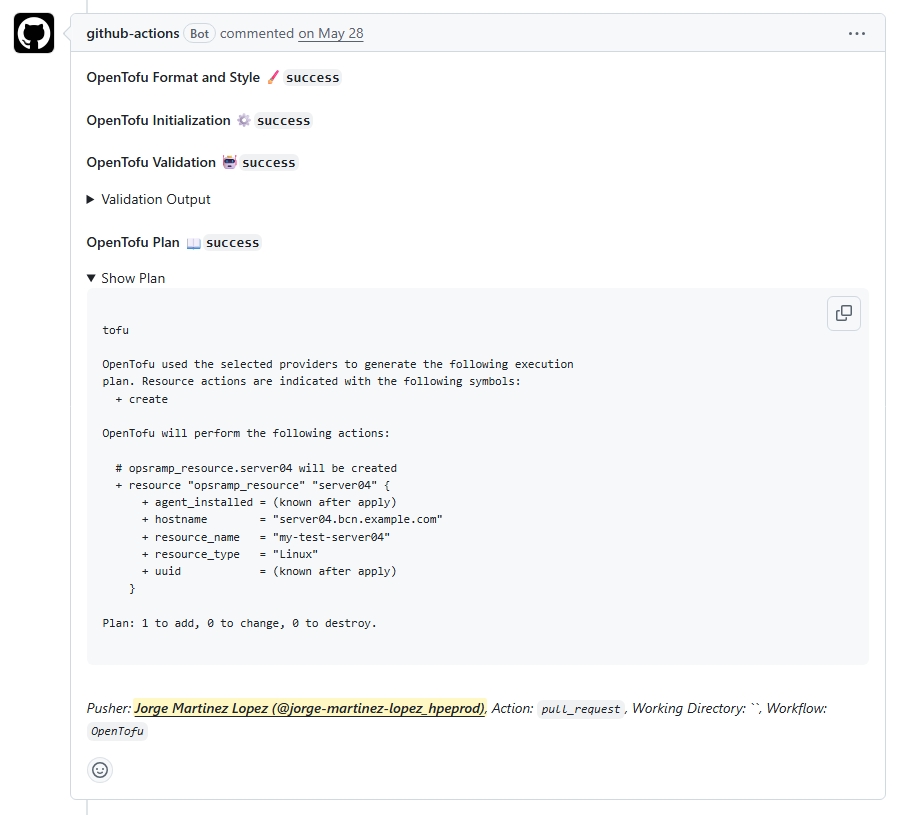
Once the pull request is approved the ''apply'' job will run, making all the necessary changes in HPE OpsRamp.
Wrapping up
In this tutorial I have set up a GitHub repository to bring a HPE OpsRamp configuration under version control. This brings a few benefits in terms of change management discipline: enables reviews and approvals, offers the possibility of rolling back to a previous configuration. I have also configured AWS S3 as backend to store the state file, allowing multiple people to make changes to the configuration while ensuring the security and integrity of the data. I have also configured GitHub Actions to run the provisioning operations on my behalf, increasing the visibility of changes.
I hope this will allow you to manage your HPE OpsRamp configuration in a quicker and easier way.
Please keep an eye to the HPE Developer Community blog for more HPE OpsRamp content.
Related

An Overview of IT Service Management using HPE OpsRamp Service Desk
Jun 25, 2026
Automating HPE OpsRamp Software with Terraform: Infrastructure as Code for autonomous IT operations
May 25, 2026
How to Transform IT Operations with AI-Infused, Full-Stack Observability
Dec 2, 2024HPE OpsRamp Continues to Push Autonomous IT Operations Forward
Dec 2, 2024
Hybrid observability service – Part 1: Provisioning and activation in HPE GreenLake Flex Solutions
May 22, 2025Hybrid observability service – Part 3: Enabling the monitoring of agentless SSH-enabled systems in HPE GreenLake Flex Solutions
May 26, 2025Hybrid observability service – Part 2: Initial configuration to enable the discovery of resources in HPE GreenLake Flex Solutions
May 23, 2025