
Open sourcing Workshops-on-Demand - Part 5: Create a new workshop
September 26, 2025In this article that is part of our series dedicated on open sourcing of our Workshops-on-Demand project, I will focus on the steps necessary to build up a new workshop. In my previous posts, I have already covered most of the pieces on how to set up the infrastructure to support the workshops. Now let's focus a little more on the content creation.
Overview
Let's start with a simple flowchart describing the 10000-foot view of the creation process:
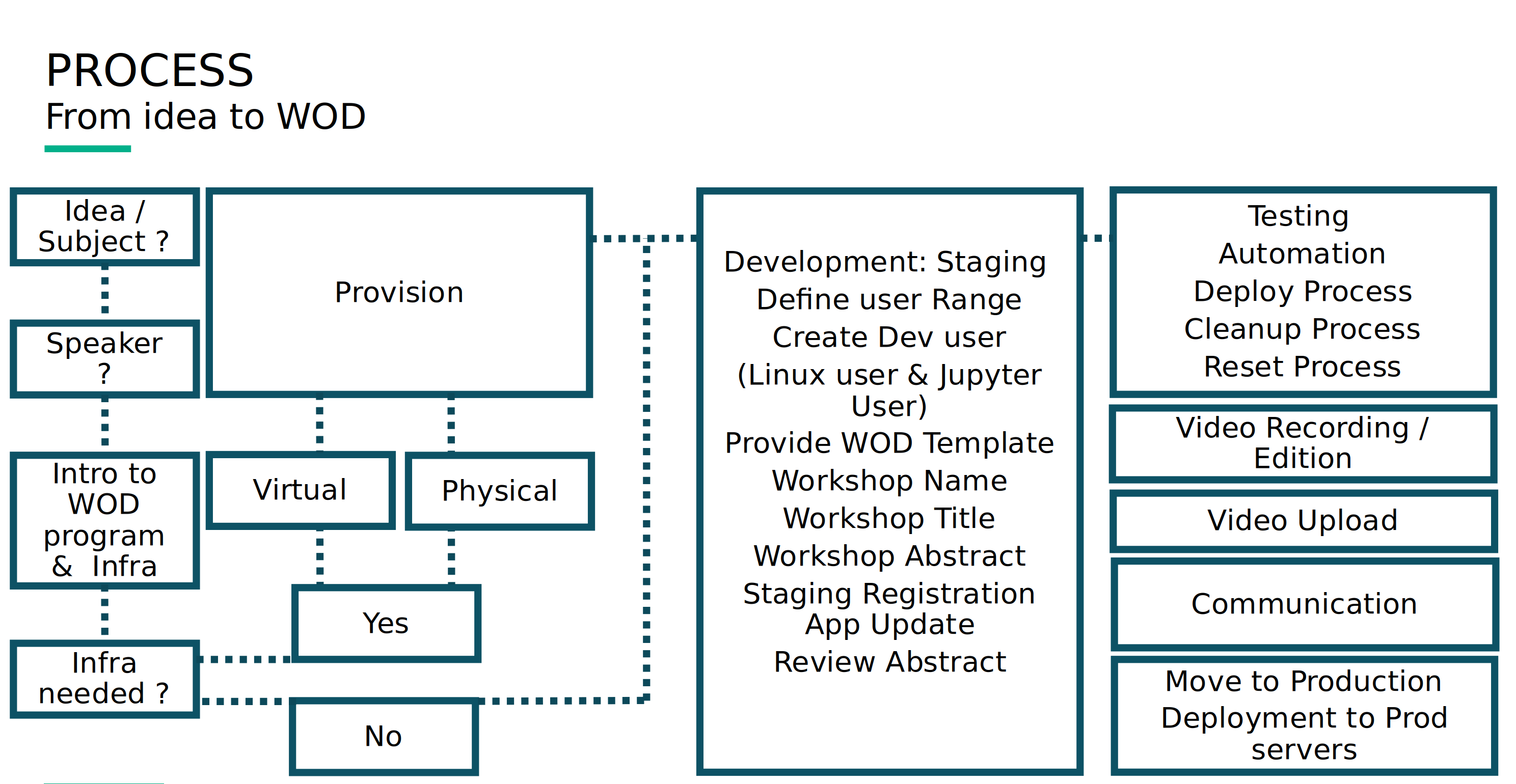
As you can see, there's no rocket science here. Just common sense. Depending on the workshop you wish to create, some obvious requirements should show up. A workshop based on a programmatic language, for instance, may require the relevant kernel to be set up on the JupyterHub server. The following page lists all available kernels.
Some workshops might need a specific infrastructure set up in order to run. A Kubernetes 101 workshop, for instance, could not exist without the presence of a proper Kubernetes cluster. The same thing goes for any HPE-related solutions.
In setting up the infrastructure, there are a number of things you need at a minimum. The design of this open-sourcing project makes it very easy to deploy a development and test environment, a staging environment, and at least one production environment.
Let's look at how each of these environments is defined :
- Development Environment: This is where application/system development tasks, such as designing, programming, debugging of a workshop, etc., take place.
- Test Environment: As the name implies, this is where the workshop testing is conducted to find and fix errors.
- Staging Environment: Here, all the work done in the development environment is merged into the built system (often used to automate the process of software compilation) before it is moved into the production environment.
- Production Environment: The last environment in workshop development, this is where new builds/updates are moved into production for end users.
When the HPE Developer Community began implementing their Workshop-on-Demand program, they originally only had a development and a test & staging environment on one end and a production environment on the other.
In this post, I won't focus on the subject selection process. I'll leave that to you to figure it out. I will, however, talk a little bit again about the infrastructure, especially the dedicated scripts and variables that you need to create to support the lifecycle of the workshop. As usual, there are two sides to the workshop's creation--what should be done on the backend and what needs to be done mainly for the api db server.
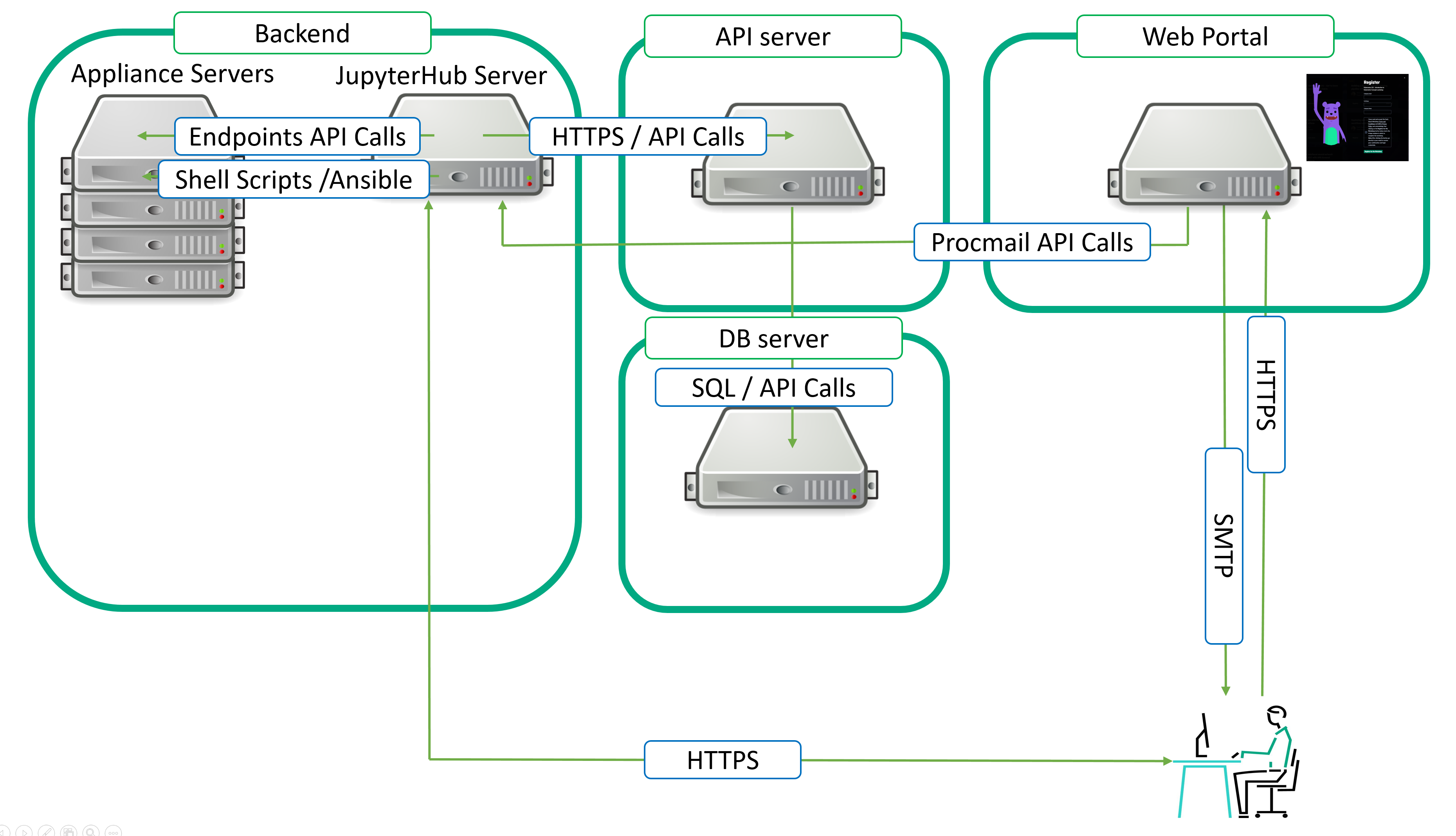
What is a workshop? What do you need to develop?
Let me use an example to better explain this. There's this engineer, Matt, who has a great deal of knowledge that he would like to share. He was kind enough to agree to working with me on creating a new workshop. After our first meeting, where I explained the creation process and the expectations, we were able to quickly start designing a workshop that would help him do this.
We defined what was needed:
- A set of notebooks that will be used by the student
- Containing instructions cells in markdown and run code cells leveraging the relevant kernel. If you are not familiar with Jupyter notebooks, a simple 101 workshop is available in our Workshops-on-Demand 's catalog.
- A student range for the workshop.
A workshop should contain at least:
- 0-ReadMeFirst.ipynb
- 1-WKSHP-LAB1.ipynb
- 2-WKSHP-LAB2.ipynb
- 3-WKSHP-Conclusion.ipynb
- LICENCE.MD
- A pictures folder (if any screenshot is required in lab instructions)
- A README.md (0-ReadMeFirst.ipynb in md format)
- A wod.yml
To make the workshop compliant to our platform, Matt just needs to provide a final file that contains a set of metadata that will be used for the workshop's integration into the infrastructure. this file is called wod.yml.
Matt can leverage a simple wod.yml file containing them and that can be later parsed in order to feed the database with the relevant info. Quite handy, no? Moreover, the same script that will create the workshop entry in the database can also be used to update it.
Here is an example of such a file:
%YAML 1.1
# Meta data for the GO101 Workshop to populate seeder
---
name: 'GO 101 - A simple introduction to Go Programming Language'
description: 'Go, also called Golang or Go language, is an open source programming language that Google developed. Software developers use Go in an array of operating systems and frameworks to develop web applications, cloud and networking services, and other types of software. This workshop will drive you through the basics of this programming language.'
active: true
capacity: 20
priority: 1
range: [151-170]
reset: false
ldap: false
location: 'fully qualified domain name of default JupyterHub server'
replayId: 31
varpass: false
compile: false
workshopImg: 'https://us-central1-grommet-designer.cloudfunctions.net/images/frederic-passeron-hpe-com/WOD-GO-101-A-simp-introduction-to-Go-programming-language.jpeg'
badgeImg: 'https://us-central1-grommet-designer.cloudfunctions.net/images/frederic-passeron-hpe-com/go101-a-simple-introduction-to-go-programming-language.jpg'
beta: false
category: ['Open Source']
duration: 4
alternateLocation: ['fully qualified domain name of an alternate JupyterHub server']
presenter: 'Matthew Doddler'
role: 'FullStack developer'
avatar: '/img/SpeakerImages/MattD.jpg'
replayLink: 'https://hpe-developer-portal.s3.amazonaws.com/Workshops-on-Demand-Coming-Soon-Replay.mp4'
The following file will be used to update the workshops table in the database. Let's have a look at what a new entry could look like:
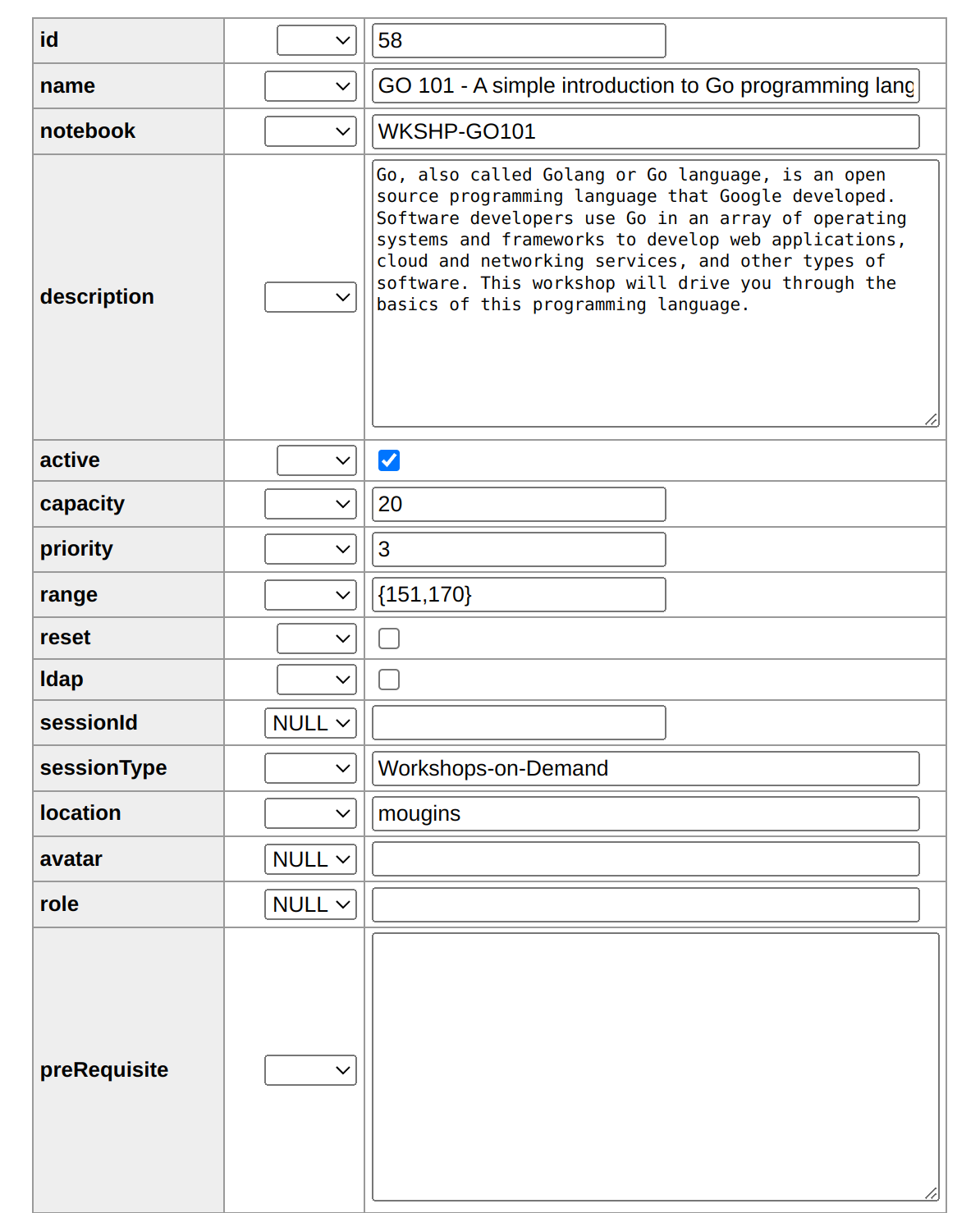
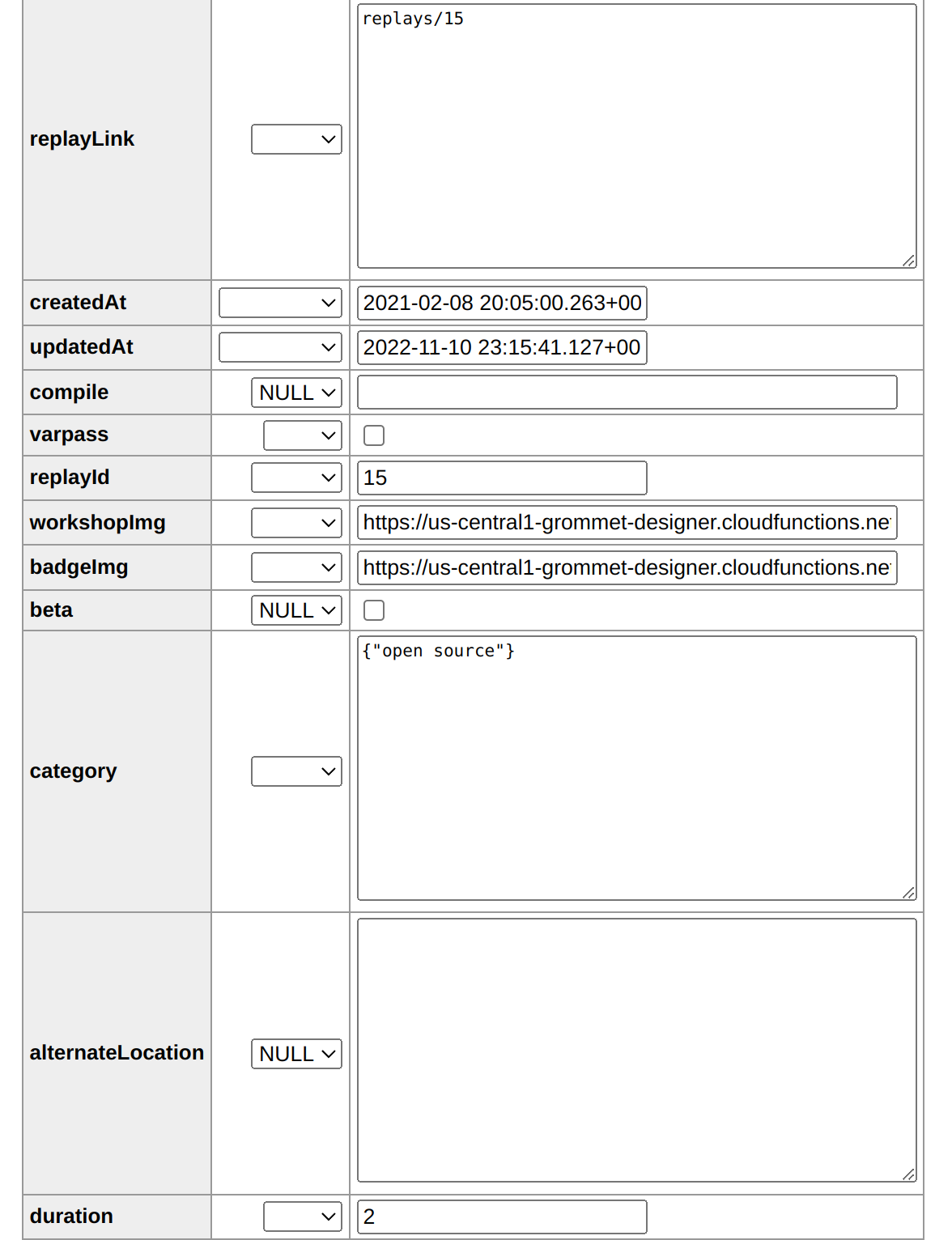
As a contributor, Matt should be able to provide all the following details.
- ID: A workshop ID to be used by backend server automation and Replays table to reference the associated replay video of the workshop (automatically created at the import of the wod.yml file process)
- name: The workshop's name as it will will be displayed on the registration portal
- notebook: The name of the folder containing all the workshop's notebooks (automatically created at the import of the wod.yml file process)
- description: The workshop's abstract as it will will be displayed on the registration portal
- avatar, role and replayLink are superseded by entries in the replay table (I will explain later)
- replayId: This entry links the dedicated replay video to the workshop and enables the presence of the replay in the learn more page of the workshop (automatically created at the import of the wod.yml file process)
- category: The workshops' registration portal proposes several filters to display the catlog's content. You can view all workshops, the most poular ones, or by category. Use this field to sort workshops accordingly.
- duration: All workshops are time bombed. You will define here the time allocated to perform the workshop
- active: Tag to set to enable visibility of the workshop's tile in the registration portal
- workshopImg: As part of the lifecycle of the workshop, several emails are sent to the student. A workshop image is embedded in the first emails
- session type: Workshops-on-Demand by default (automatically created at the import of the wod.yml file process)
The following fields are required by the infrastructure. In this example, I will work as the infrastructure Admin with Matt to define them.
- capacity: The number of maximum concurrent students allowed to take on the workshop
- range: The range between which students get picked at registration time
- reset and ldap entries are to be used by backend server automation if dedicated reset scripts and ldap authentication are required by the workshop
- location: If your setup includes multiple JupyterHub servers, use this field to allocate workshops according to your needs.
- compile: This entry will be filled with the name of a script to be compiled at deployment time. This feature allows the admin to hide login scripts and credentials in non-editable executable files.
- varpass: This defines whether or not a workshop requires a password variable needs to be leveraged
- badgeImg: As part of the lifecycle of the workshop, several emails are sent to the student. In the final email, a badge is included. It allows the student to share its accomplishment on social media like linkedin for instance.
- beta: Not implemented yet :-)
- alternateLocation: (Future development) The purpose is to allow automation of the relocation of a workshop in case of primary location's failure
- replayLink: YouTube link of the recorded video to be used as a replay
- replayid: This ID is used to link the correct video to the workshop. This is the replayId present in the workshops table (automatically created at the import of the wod.yml file process)
- monoAppliance: Some workshops require a single dedicated appliance
- multiAppliance: Some workshops require multiple dedicated appliances
Note: Both WorkshopImg and BadgeImg are delivered by the frontend web server.
If you feel you need more details about the registration process, please take a look at the Register Phase paragraph in the following introductionary blog.
Matt will create a simple workshop that does not require any infrastructure but the JupyterHub itself. As far as the infrastructure's requirements, a new kernel was needed. No additional scripts were required for this workshop.
As an admin of the Workshops-on-Demand infrastructure, I have to perform several tasks on a development environment and a staging environment:
On the backend server:
Testing and validating installation of the new kernel on the staging backend server by:
- Creating a new branch for this test
- Modifying the backend server installation yaml file to include the new kernel
- Validating the changes by testing a new backend install process
Pushing the changes to the GitHub repo:
- Create a user for the workshop developer on the test/dev and staging backend servers
- Provide to the developer the necessary information to connect to the test/dev and staging backend servers
- Copy in the developer's home folder a workshop template containing examples of introduction, conclusion, and lab notebooks, allowing him to start his work
- Give the developer the wod-notebook repo url for him to fork the repo and work locally on his machine (when the workshop does not require an appliance but just a Jupyter kernel for instance)
- When ready, a pull request can be made. The admin can then review and accept it. The admin can then perform the necessary steps required to prepare the infrastructure to host the workshop
On the api-db server:
Connecting to the api-db server as wodadmin user:
- Switch to the relevant branch for the new workshop and perform a git remote update / rebase in the relevant notebook directory.
- Move to wod-api-db/scripts directory
- Update the database by running the wod-update-db.sh script.
This script will update the Database workshops table with the new workshop's entry.
As the developer of the Workshops-on-Demand content, Matt had to perform several tasks:
On the backend server:
- Log on to the backend server and clone the notebook repo in his home folder, or as explained earlier, fork the repo on his laptop and work from there
- Create a new branch for his workshop following the naming convention defined with the admin
- Leverage the template provided by me to build up the content of his workshop
- Test the workshop locally on his laptop or on the dev server leveraging the
wod-test-action.shscript - Test the workshop using the staging registration portal
- When all tests are green, create a pull request to merge content with the master repo
As an admin, I would need to check the pull request and accept it. Once done, the test/dev and staging environments will require an update.
- Log on to the backend server as wodadmin and update the notebook repository.
Run a wod-deliver to update the relevant backend server.
git remote update
git rebase
wod-deliver
The very same processes will apply to the move to production phase.
Complex workshop example:
If you've ever had to develop a workshop for something you're not as familiar with, you'll want to meet with SMEs and explain what your goals are and how to achieve them. Once you have a clearer understanding of the technology involved, you can move on to determine what the best platform would be on which to run the workshop. I can give you an example here focusing on Ansible, an automation tool. I was not originally familiar with it before I developed the Ansible 101 Workshop. In the steps below, I'll explain how I pulled it together..
As the admin for the HPE Developer Community's Workshops-on-Demand infrastructure, I had to perform several tasks in order to set up this workshop. I had to determine what the workshop required from a backend and fully test it.
On the backend server:
The workshop will require:
A dedicated server running Linux to allow the student to run Ansible playbooks against during the workshops' labs.
- This means preparing a server (VM or physical) : We will consider it as an appliance
- Updating the relevant variable file to associate the IP address of the server to the workshop (there could be multiple servers too associated to a given workshop)
A set of scripts under wod-backend/scripts or wod-private/scripts folders depending on the nature of the workshop to manage the workshop's lifecycle
Some generic scripts applying to all workshops' appliances : general setup phase setting up common requirements for any appliance (student users creation, ssh keys, etc..) up to some specific ones dedicated to a given workshop
- create-appliance.sh (ssh keys, ldap setup)
setup-appliance.sh [WKSHP-NAME] (Student setup, Appliance Setup, Workshop setup) calls:
- setup-globalappliance.sh (global / generic setup)
- setup-[WKSHP-NAME].sh (Prepare appliance with workshop's reqs, Docker image for instance)
- create-[WKSHP-NAME].sh (called at deployement time to instantiate the necessary appliance(s) requiered by the workshop
- reset-appliance (reset ssh keys and students credentials on appliance
- cleanup-[WKSHP-NAME].sh (takes care of cleanup some workshop's specifics)
- reset-[WKSHP-NAME].sh (reset of the workshop's appliance, docker compose down of a container for instance)
A set of variables to be leveraged by the notebooks. These variables are to be set in yml format. They will be parsed at deployment time to set student ids, appliance IP addresses, and other relevant parameters like ports, or simulated hardware information
When all the scripts are functional and the necessary actions have been performed both on backend and frontend servers, some functional tests can be conducted using cli and later webui as described earlier for the simple workshop example.
Testing the workshop:
One can leverage the wod-test-action.sh script to test a workshop lifecycle action from deployment (CREATE) to CLEANUP, RESET, or PURGE.
dev@dev3:~$ wod-test-action.sh
Syntax: wod-test-action.sh <CREATE|CLEANUP|RESET|PURGE|PDF|WORD> WKSHOP [MIN[,MAX]
ACTION is mandatory
Note: The available trace under ~/.mail/from will detail the different steps of the action and allow you to troubelshoot any issue.
When all tests have validated the workshop, it can follow the move to prod cycle.
You should now have a better understanding of the necessary tasks associated to the creation of a workshop. As you can see, it requires steps on the various sides of the infrastructure.
This was the last blog post of the series. The Workshops-on-Demand project is available here. Further update of the documentation will occur on this github repository.
If we can be of any help in clarifying any of this, please reach out to us on Slack. Please be sure to check back at HPE DEV for a follow up on this. Also, don't forget to check out also the Hack Shack for new workshops! Willing to collaborate with us? Contact us so we can build more workshops!
Related
Open Sourcing Workshops-on-Demand part 3: Understanding the Backend
Apr 5, 2023Open sourcing Workshops-on-Demand part 4: Manage the Backend
Jul 18, 2023
Open Sourcing Workshops-on-Demand part 2: How to Deploy the infrastructure
Oct 9, 2025
1 Trillion Row Challenge Using Arkouda
Aug 11, 2026
10 Myths About Scalable Parallel Programming Languages (Redux), Part 1: Productivity and Performance
Apr 30, 202510 Myths About Scalable Parallel Programming Languages (Redux), Part 2: Past Failures and Future Attempts
Jun 2, 202510 Myths About Scalable Parallel Programming Languages (Redux), Part 3: New Languages vs. Language Extensions
Jun 26, 2025